
Use the same revenue base
Start with the receipts the software actually charges a fee on. Ask whether that base includes taxes, extras, refunded reservations and bookings taken by phone. A percentage applied to the wrong base produces a tidy but misleading comparison. Keep payment-processing costs separate from software fees.
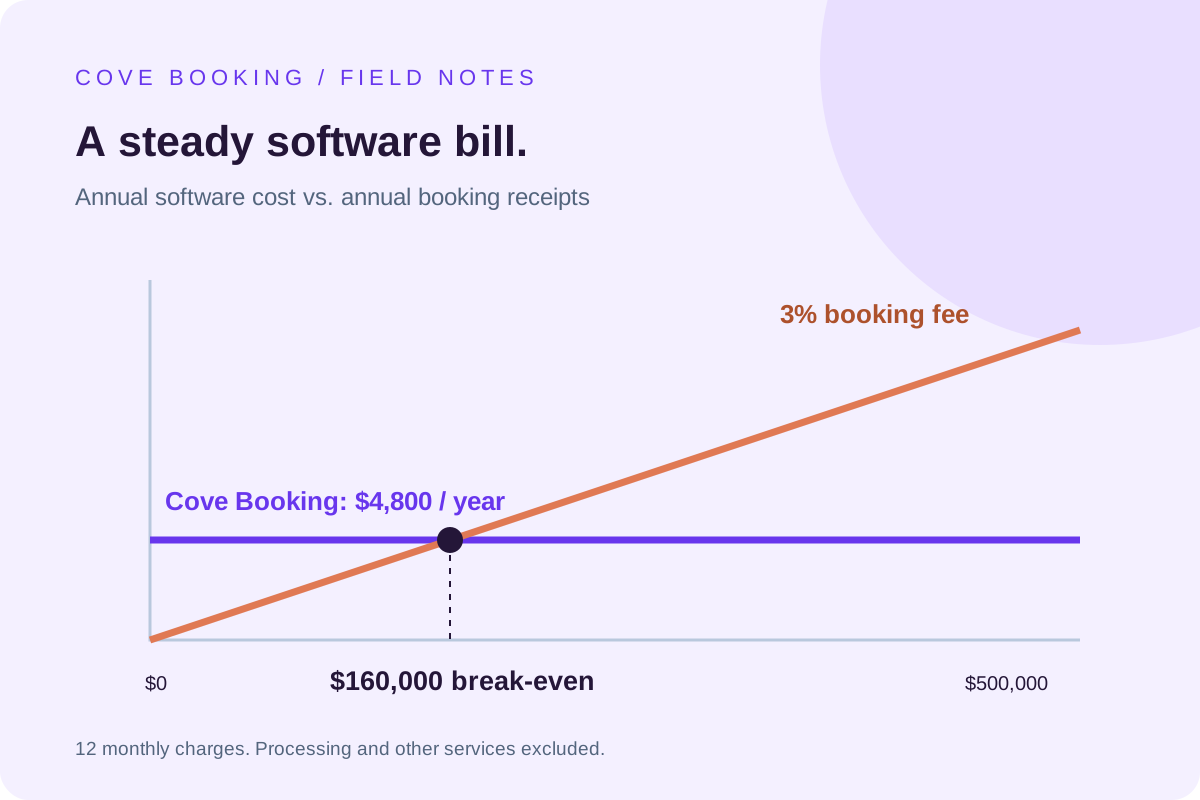
| Annual bookings | 3% fee | Cove Booking | Cove Booking costs |
|---|---|---|---|
| $100,000 | $3,000 | $4,800 | $1,800 more |
| $160,000 | $4,800 | $4,800 | The same |
| $200,000 | $6,000 | $4,800 | $1,200 less |
| $300,000 | $9,000 | $4,800 | $4,200 less |
| $500,000 | $15,000 | $4,800 | $10,200 less |
Find the break-even point
Divide the annual fixed software charge by the percentage rate expressed as a decimal. For Cove Booking, $4,800 divided by 0.03 equals $160,000. At that point the two software charges match. This is arithmetic, not a forecast of how much your business will book.
Budget for all twelve months
A fleet that earns most of its revenue in summer still needs an annual cost view. Cove Booking’s comparison assumes twelve $400 payments. It does not assume a seasonal pause, annual discount or special contract. Ask for those terms in writing if they matter to your operation.
Keep the other costs visible
Add separate lines for setup, website work, migration, card processing, messages and any phone service. Record who pays each charge. A fee paid by a guest is part of the guest’s checkout price; it is not automatically an expense you recover by switching providers.
Use the number to start a demo
Open Cove Booking’s calculator with your actual annual receipts and current software rate. It shows both savings and additional cost. Then test the workflow with your staff. A lower price cannot compensate for a missing requirement, and a higher price needs a practical reason.
Put your own operation in the picture.
Bring a busy-day booking, your current software bill and the workflow your team wants to improve.
Walk through Cove Booking